
Best OpusClip Alternatives in 2026: the buyer's shortlist
By Anatolii Zhukovskyi, Founder of FastClip
The best OpusClip alternative in 2026, on the same seven criteria we use for every clip maker, is Headliner: like OpusClip it finds clips by itself and posts them, and it adds exact cuts, audio and RSS inputs and a plan from $7.99 a month billed yearly. Vizard is second and the closest like-for-like switch for OpusClip's automatic batches. FastClip, which we make, is third: the best OpusClip alternative when you want to pick the exact moment yourself, free and with no watermark.
Disclosure: FastClip publishes this page, and FastClip is one of the products ranked. We rank by the criteria below, say plainly where other tools are better, and cite the source of every fact with the date we checked it. No company paid to be listed, and we earn nothing from the links.
Before you switch, read FastClip vs OpusClip for a line-by-line comparison, and the guide to finding viral moments for what makes a clip worth posting, whichever tool cuts it.
Key Takeaways
- Headliner scores highest (13/14). Its AI finds up to 10 clips per upload like OpusClip does, you can also type exact times, and it costs $7.99 a month billed yearly. Its video clipping is free during a beta, but its help center says a watermark appears after the first free export each month.
- Vizard is second (11/14) and the closest like-for-like switch. It returns a ranked batch from a long video, Creator costs the same $14.50 a month billed yearly as OpusClip Pro, and, unlike OpusClip, it keeps the editor on its free plan. Free exports still carry a watermark and stop at 720p.
- FastClip is third (10/14) and the best free alternative without a watermark. You choose each cut yourself from suggested moments, and the free plan has 100 finished clips in total with no watermark. It makes no batch of clips, so it replaces OpusClip only if you post one chosen moment at a time.
- Ssemble is the cheapest automatic clipper here, and Klap says it never adds a watermark. Both have catches. Ssemble costs $6 a month billed yearly, but has no free plan and no refunds. Klap gives one free video and no way to trim to an exact moment.
- Most OpusClip-style tools charge by the length of the source. OpusClip and Vizard count each minute you import, Ssemble one credit per 20 minutes, and Choppity hours of AI analysis. If you clip one moment from a long episode, per-minute credits make you pay for the whole episode.
Try it on one episode
Paste a link here, or upload the episode file in the app. Start from a suggested moment and set the exact start and end. Free, no credit card, no watermark.
What an OpusClip alternative actually is (and what it is not)
OpusClip is an automatic clipper: you give it a long video, it returns a ranked batch of short vertical clips with captions and, on paid plans, a Virality Score, and it can post them for you. An alternative is a tool that does the same job, or the part of it you actually use, with a better free plan, a lower price or more control over where each clip starts and ends.
People switch for reasons that are on OpusClip's own pricing page: free exports carry a watermark, the free plan has no editor, and free clips can no longer be exported after 3 days. Credits are another reason, because OpusClip counts every minute of video you import, however many clips you keep. The last reason is the cut itself: AI clips often start mid-sentence or stop before the payoff, and clipping campaigns reject those. Some alternatives let you set the exact start and end.
What it is not: a way to remove OpusClip's watermark. The honest routes to a clean clip are a paid OpusClip plan or a tool whose free plan adds no watermark; cropping a watermark away also cuts off part of the picture. It is not a full video editor either: for music, effects and multi-track timelines, use an editor such as CapCut or DaVinci Resolve together with a clipper.
See FastClip make one clip
How We Ranked These OpusClip Alternatives
We score every clip maker on the same seven criteria, 0 to 2 each, so these numbers match our podcast clip maker ranking. Every score comes from the vendor's own pricing and help pages, read on the dates listed under Sources; where a vendor's pages contradict each other, we used the less generous statement. OpusClip is scored too, for comparison, but not ranked.
- Exact cut. 2 if you can make a new clip from any start and end you choose (typed times, timeline handles or selected transcript words); 1 if you can only adjust clips the AI made or the range it scans; 0 if neither.
- Free plan. 2 if the free plan gives at least 10 watermark-free clips a month or 100 in total; 1 if free exports exist but carry a watermark, are limited to one watermark-free export a month, or are a one-off trial; 0 if you cannot export for free.
- Lowest price. The cheapest paid plan per month, yearly billing allowed: 2 for $0 or under $10, 1 for $10 to $20, 0 for more than $20.
- Ways in. Three ways to bring a video in: a YouTube link, a video file and an audio-only file. 2 for all three, 1 for two, 0 for one. We take each vendor at its word, except FastClip, whose own records show most YouTube imports refused today.
- Automatic clips. 2 if the tool finds and returns a batch of clips by itself; 1 if it suggests a few moments for you to cut; 0 if neither.
- Caption languages. The number of transcription languages the vendor publishes: 2 for 50 or more, 1 for 20 to 49, 0 for fewer or none published.
- Direct posting. 2 if the tool posts to four or more social networks on some plan, 1 for one to three, 0 for none.
| Tool | Cut | Free | Price | Inputs | AI clips | Languages | Posting | Total |
|---|---|---|---|---|---|---|---|---|
| Headliner | 2 | 1 | 2 | 2 | 2 | 2 | 2 | 13/14 |
| Vizard | 2 | 1 | 1 | 2 | 2 | 1 | 2 | 11/14 |
| FastClip | 2 | 2 | 2 | 1 | 1 | 1 | 1 | 10/14 |
| Choppity | 2 | 0 | 1 | 1 | 2 | 2 | 2 | 10/14 |
| Klap | 1 | 1 | 1 | 1 | 2 | 1 | 2 | 9/14 |
| Descript | 2 | 1 | 1 | 1 | 2 | 1 | 1 | 9/14 |
| Ssemble | 2 | 0 | 2 | 1 | 2 | 1 | 1 | 9/14 |
| Submagic | 1 | 1 | 1 | 1 | 2 | 1 | 1 | 8/14 |
| OpusClip (for comparison, not ranked) | 1 | 1 | 1 | 1 | 2 | 1 | 2 | 9/14 |
Ties are broken by the free-plan score, then by the lower price. FastClip and Choppity both score 10, and FastClip ranks first on its free plan. Klap, Descript and Ssemble all score 9: Klap and Descript rank on price, and Ssemble follows because it has no free plan. Submagic (8) is last.
How we checked. We read each vendor's pricing page, help center and, where they exist, its Trustpilot and App Store pages, without signing up for anything. We tested FastClip itself: its numbers come from its code and from its production records for the 30 days to October 14, 2026. G2 and Capterra blocked our requests, so we left their ratings out. We scored FastClip one point lower on ways in, because YouTube has refused most downloads from FastClip's servers since October 7, 2026.
The Best OpusClip Alternatives in 2026
Ranked by total score. Each entry compares the tool with OpusClip: what it does better, what it does worse, and what it costs.
- 1.Headliner, best for OpusClip-style AI clips with exact cuts and a cheaper plan
- 2.Vizard, best like-for-like switch from OpusClip
- 3.FastClip, best free OpusClip alternative when you pick the moment yourself
- 4.Choppity, best for AI clips with exact From and To times
- 5.Klap, best for automatic clips that Klap says never carry a watermark
- 6.Descript, best when you want an editor more than an auto-clipper
- 7.Ssemble, best for the lowest price per long video
- 8.Submagic, best for styled captions, with clip finding as an add-on
1.Headliner, best for OpusClip-style AI clips with exact cuts and a cheaper plan
Headliner does what most people use OpusClip for: give it a long video or a YouTube link, and its AI finds up to 10 clips per upload, captions them and can post them to YouTube, Instagram, TikTok, LinkedIn, Facebook, X and Threads. Where it goes further: you can type exact start and end times or highlight transcript text to make a clip of your own, it accepts audio files and podcast RSS feeds, and it makes audiograms for audio-only shows. It captions in more than 100 languages; OpusClip lists 25.
Basic costs $9.99 a month or $7.99 a month billed yearly, with 1080p video up to 10 minutes and auto-posting; OpusClip Starter costs $15 a month, billed monthly only. Headliner's free plan is ad-supported. Its pricing page says video clipping and captioning are free on any account during a beta, and its video clipper page says free video clips have no watermark; its help center says a watermark appears after a free user's first export each month. We scored the stricter statement.
Limits to know: the editor exports at most 10 minutes, Basic captions at most 10 minutes per project, and there is no virality score. The iPhone app has 4.84 out of 5 from 4,972 US App Store ratings. Headliner is made by Sparemin, a New York company co-founded by Neil Mody.
Best suited for: OpusClip users who want AI clips plus the option to cut by hand, for less money. Make a test export on the free plan before you count on it being watermark-free.
2.Vizard, best like-for-like switch from OpusClip
Vizard works the way OpusClip does: import a long video by link or upload a video or audio file, get a ranked batch of clips, then edit them and schedule them to TikTok, YouTube, LinkedIn, X, Instagram and Facebook Pages. Vizard says it can find up to 40 clips in a one-hour video, which is its claim. It has two things OpusClip's free plan lacks: the full editor, and a way to make a clip by hand by selecting transcript text.
The price matches OpusClip Pro: Creator costs $29 a month or $14.50 a month billed yearly, with no watermark and 4K export. The free plan has 60 credits a month, one per uploaded minute, like OpusClip's, but exports at 720p and at most 10 minutes, with a watermark, and free projects are deleted after 3 days. Free uploads are capped at 60 minutes and 1 GB.
Vizard transcribes 40 languages, against OpusClip's 25. On Trustpilot it has 4.7 out of 5 from 2,521 reviews, the most Trustpilot reviews of any tool on this page, and its iPhone app has 4.8 from 773 ratings. Like OpusClip, it counts source minutes, so a long episode costs its full length even when you keep one clip.
Best suited for: OpusClip users who want the same automatic workflow with an editor on the free plan and more caption languages. It does not fix the watermark unless you pay.
3.FastClip, best free OpusClip alternative when you pick the moment yourself
FastClip is our product. It is not an automatic batch clipper like OpusClip, and that is the point: you pick the moment and FastClip makes it a clean clip. It opens on a suggested moment (the parts viewers replay most on YouTube, AI picks from the transcript, or the loudest parts), and you set the exact start and end by typing times, dragging on the timeline or selecting words in the transcript, so the clip starts on a full sentence. It burns in word-timed captions you can correct word by word, removes ums and pauses when you ask, and crops to 9:16 while following the speaker's face.
Against OpusClip's free plan: FastClip's free plan has 100 finished clips and 50 YouTube or upload imports in total, no watermark, an editor, and clips that stay downloadable; OpusClip's free clips carry a watermark and stop being exportable after 3 days. FastClip counts clips, not minutes, so one clip from a three-hour episode uses one finished clip and one of the 50 imports. There is no paid plan; the daily limits are 30 finished clips and 50 drafts. The Instagram version adds a small "Made with fastclips.app" line by default, which you can turn off in the publishing settings; the downloaded MP4 has none.
Where OpusClip is better: it finds and ranks a batch of clips by itself, posts to nine networks (FastClip posts to Instagram and X, one post each on the free plan), exports up to 4K and has a rated mobile app. And since October 7, 2026, YouTube has refused most downloads from FastClip's servers, so upload the file instead of pasting a YouTube link.
Best suited for: Clippers and podcasters who post one chosen moment at a time and are tired of watermarks and expiring free clips. Stay with an automatic tool if you need ten clips per video without choosing them.
FastClip, as it looks today
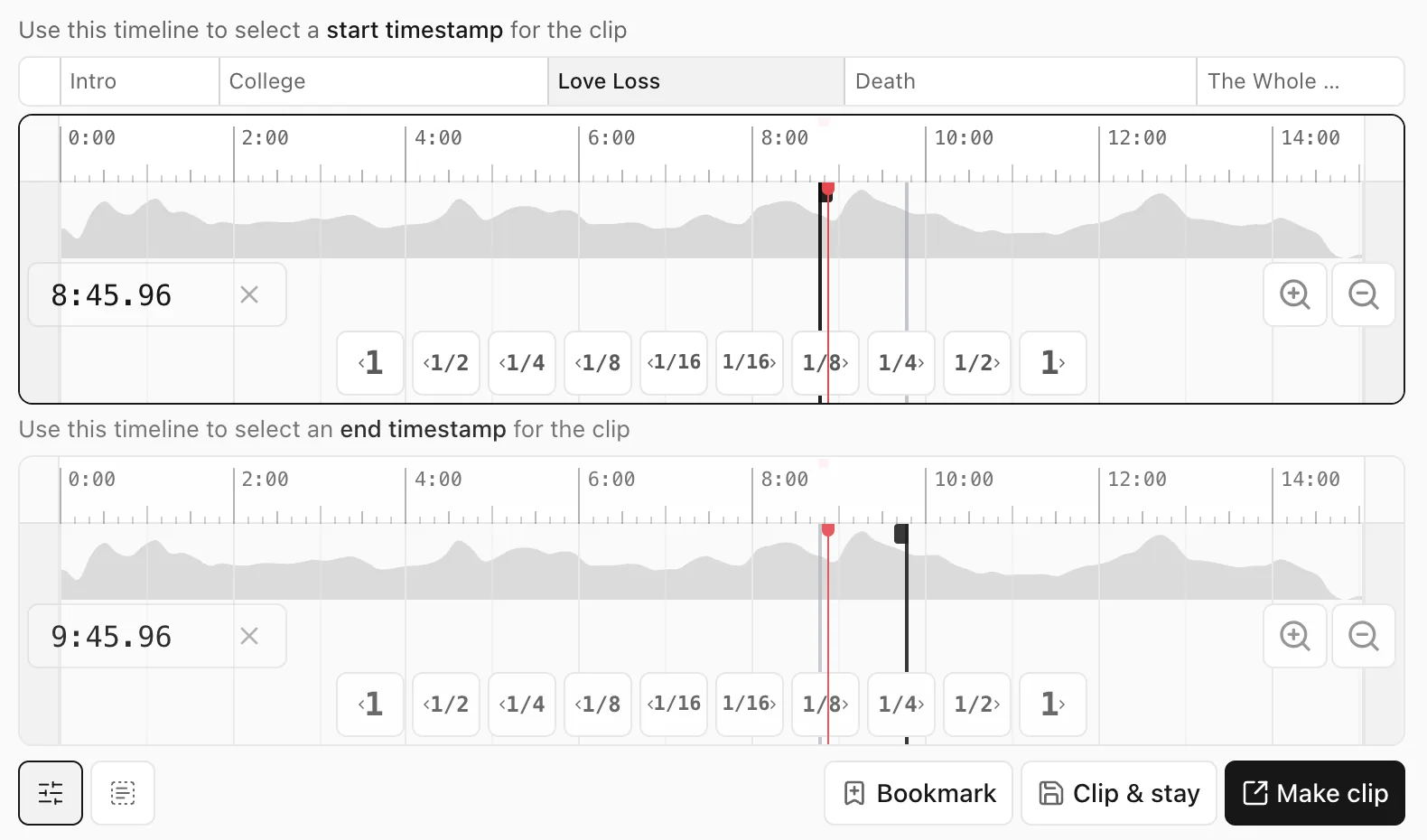
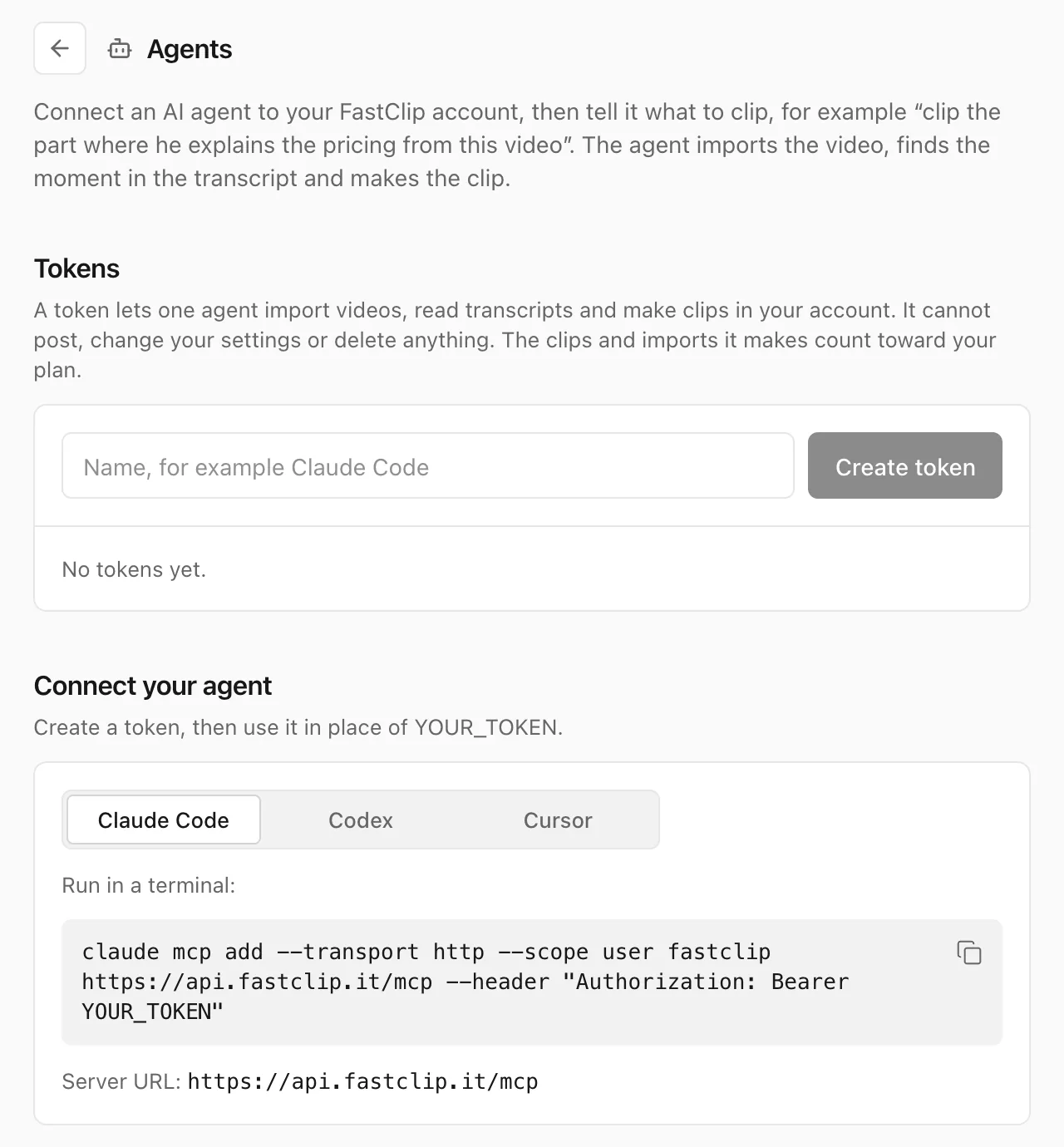
Screenshots of the FastClip web app, October 14, 2026.
4.Choppity, best for AI clips with exact From and To times
Choppity turns podcasts and long videos into many short clips: its AI finds, crops and captions the moments, and you can set a target length from 15 seconds to 3 minutes or give it instructions. Unlike OpusClip, its Trim tab has From and To time fields, and you can make a clip from a selection of transcript words. It captions 97 languages and, on paid plans, posts or schedules to TikTok, Instagram Reels, YouTube Shorts, Facebook Reels and LinkedIn.
The free plan gives 1 hour of AI video analysis a month with the full editor, but you cannot download, post or schedule from it, and projects are kept for 3 days. Starter costs $24 a month or $16.80 a month billed yearly: 3 hours of AI analysis a month, 1080p and 4K exports and one social account.
Choppity's help center says YouTube can block imports and suggests retrying later or uploading the file. It has 3.3 out of 5 from 16 Trustpilot reviews. Two Durham University graduates started Choppity, and the Australian company Mizko Media bought it in October 2025.
Best suited for: Podcasters who want AI clips and exact trims by time in the same tool, and will pay to download. Use the free plan only to judge the AI's picks.
5.Klap, best for automatic clips that Klap says never carry a watermark
Klap turns long videos into vertical TikToks, Reels and Shorts in one click. It imports YouTube links and files up to 4 hours long, finds topics in the speech, captions 31 to 57 languages by its own different pages, and posts or schedules to TikTok, YouTube, Instagram, LinkedIn and Facebook. Klap says it never adds a watermark, on any plan, including the free one.
The free option is one video, presented as a one-off trial. Basic costs $29 a month or $14 a month billed yearly for 100 clips a month, and Pro covers 300 clips a month. In its current pricing Klap counts generated clips, not source minutes (it is testing other units), which is cheaper than OpusClip for long episodes.
The catch is control: you can keep or strike sentences of an AI clip in its transcript, but Klap's own YouTube page says it is not the right tool if you need to trim to an exact moment. It needs a video, so audio-only podcasts do not work. Trustpilot shows 3.7 out of 5 from 51 reviews. Théo Champion and Victor Timsit run the French company behind Klap, founded in 2020.
Best suited for: OpusClip users whose main problem is the watermark and who are happy with the AI's choice of moments. Not for exact cuts.
6.Descript, best when you want an editor more than an auto-clipper
Descript is a full video editor in which you cut video by editing its transcript. Its Create Clips tool works like a small OpusClip: it makes 1 to 20 clips of 10 seconds to 5 minutes, steered by an optional topic prompt. Unlike OpusClip, you can make your own clip from selected transcript text, and captions, layouts and B-roll live in the same project. Descript says more than 6 million creators and teams use it, which is its claim.
The free plan gives 60 media minutes a month with watermarked 720p exports. Hobbyist costs $24 a month or $16 a month billed yearly for 10 media hours a month and watermark-free 1080p exports. Descript turned off YouTube link import, so you upload the file, and it transcribes 26 languages, all in the Latin alphabet.
Trustpilot shows 2.6 out of 5 from 290 reviews, the lowest score on this page. Descript publishes to YouTube and to podcast hosts, not directly to TikTok or Instagram, and it has no mobile app.
Best suited for: Editors who want automatic clip drafts inside the editor they already use. A detour if all you want is OpusClip without the watermark.
7.Ssemble, best for the lowest price per long video
Ssemble turns YouTube and Vimeo videos or uploads into captioned vertical shorts and posts them to TikTok, YouTube and Instagram on a schedule. It charges per video, not per minute: one credit covers up to 20 minutes of source, however many clips come out. You choose the exact range it scans, set the number of clips from 1 to 12, and can move a clip's start or end to any word.
Pro costs $15 a month or $6 a month billed yearly for visitors from the US, with 360 credits a year. There is no free plan and no free trial: you can generate preview clips, but downloading or posting needs a plan, and Ssemble's help center says purchases are not refunded, including for poor clip quality.
Ssemble's help center says it works only for videos of people talking, and uploads are limited to 30 minutes and 1 GB. It captions 37 languages. Trustpilot shows 3.7 out of 5 from 42 reviews. Eric TaeJun Lee founded Ssemble.
Best suited for: Clippers on a tight budget who process many long talk videos. Generate preview clips first, because there are no refunds.
8.Submagic, best for styled captions, with clip finding as an add-on
Submagic is a captions-first short-video editor: animated caption styles, emojis, highlights, silence and bad-take removal, B-roll and zooms. Its long-to-short clipper, Magic Clips, is a separate add-on that costs $19 a month according to its help center, and its processing can take 10 to 25 minutes.
There is no free plan, only a trial of 3 short videos with a watermark. Starter costs $19 a month or $12 a month billed yearly: 15 videos a month of up to 2 minutes each, 1080p at 30 fps, no watermark and no publishing. Pro and higher plans post to social networks, though Submagic's pages disagree about which ones; we scored the three every page names (TikTok, YouTube and Instagram).
You trim clips on a timeline or by removing words from the transcript, but Submagic documents no way to type exact start and end times. Its pages give different caption language counts, from 48 to 123. Trustpilot shows 4.5 out of 5 from 850 reviews. David Zitoun co-founded Submagic in 2023, and its registered address is in Paris; in a June 2025 interview he said it made about $8 million a year without outside funding.
Best suited for: Creators who already have short clips and want the most polished captions. An expensive OpusClip replacement once you add Magic Clips.
Side-by-Side Comparison
The eight alternatives, with OpusClip at the bottom for comparison. Prices are per month in US dollars.
| Tool | Score | Free plan | Lowest price | Exact cut | Automatic clips | Watermark on free exports | Works with AI agents (MCP) |
|---|---|---|---|---|---|---|---|
| Headliner | 13/14 | Ad-supported; video clips free during a beta | $7.99 billed yearly, $9.99 monthly | Yes: typed times or transcript | Yes, up to 10 per upload | After the first export a month (help center) | Not found on its pages |
| Vizard | 11/14 | 60 minutes a month, 720p, projects kept 3 days | $14.50 billed yearly, $29 monthly | Yes: transcript selection | Yes, ranked batch | Yes | Not found on its pages |
| FastClip | 10/14 | 100 finished clips in total | $0: nothing to buy | Yes: typed times, timeline or transcript words | Suggests a few moments for you to cut | None on the MP4 | Yes: sign-in (OAuth) or personal token; the agent cuts the exact start and end it chooses |
| Choppity | 10/14 | 1 hour of AI analysis a month, no downloads | $16.80 billed yearly, $24 monthly | Yes: From and To times | Yes, ranked batch | No downloads on the free plan | Yes: sign-in (OAuth) or API key; the AI picks the clips; paid plan |
| Klap | 9/14 | 1 video, once | $14 billed yearly, $29 monthly | Partly: edit AI clips by transcript | Yes, ranked batch | None (Klap's statement) | Yes: sign-in (OAuth); the agent cuts the exact start and end it chooses |
| Descript | 9/14 | 60 media minutes a month, 720p | $16 billed yearly, $24 monthly | Yes: transcript selection | Yes, 1 to 20 clips | Yes | Yes: sign-in (OAuth) |
| Ssemble | 9/14 | None (previews only) | $6 billed yearly, $15 monthly | Yes: scan range and word-level edges | Yes, 1 to 12 clips | No downloads without a plan | Yes: API key; exact ranges of 60 seconds or more; paid plan |
| Submagic | 8/14 | Trial of 3 short videos | $12 billed yearly, $19 monthly; Magic Clips $19 extra | Partly: timeline and transcript trim | Add-on | Yes, on the trial | Yes: sign-in (OAuth) or API key |
| OpusClip (for comparison, not ranked) | 9/14 | 60 minutes a month, no editor, export within 3 days | Pro $14.50 billed yearly; Starter $15, monthly only | Partly: scan range and clip edges | Yes, ranked batch with score | Yes | Yes: sign-in (OAuth); the AI picks the clips; paid plan |
The last column is not scored. It says whether the vendor's own pages document an MCP server, the open standard that lets an AI agent such as Claude, ChatGPT, Cursor or Codex use the tool for you. We read each vendor's pages on October 14, 2026; the links are under Sources.
Which OpusClip alternative fits your use case
Pick by the one thing that made you look for an alternative.
| If you want | Pick | Why |
|---|---|---|
| OpusClip's automatic clips for less, with exact cuts too | Headliner | AI finds up to 10 clips; typed times; from $7.99 a month |
| One chosen moment, free, with no watermark | FastClip | You set the cut; no watermark; nothing to buy |
| The same workflow as OpusClip, with an editor on the free plan | Vizard | Ranked batches, transcript selection, 40 languages |
| AI clips plus exact From and To times | Choppity | Trim tab with time fields; 97 caption languages |
| The most styled captions | Submagic | Caption styles, emojis, silence removal |
| Automatic clips that the vendor says never carry a watermark | Klap | Counts clips, not minutes; no watermark by its own statement |
| Clips inside a full transcript editor | Descript | Create Clips in the same project as your edit |
| The lowest price per long video | Ssemble | One credit per 20 minutes of source, from $6 a month |
What results look like
Measured numbers for FastClip from our own production records, and the numbers the other vendors publish, labelled as their claims.
- FastClip, 30 days to October 14, 2026: 83 people finished 192 clips; half of them were ready within 15 seconds of pressing Finish, and 162 within a minute.
- FastClip's failures in the same period: 186 clips were not made because YouTube refused the download from our servers. They did not count against the free plan's limits.
- Choppity (its own test): it processed a 1.2-hour video in 9 minutes 11 seconds, against 11 minutes 8 seconds for OpusClip.
- Submagic (its claim): Sportskeeda scaled to more than 2,500 videos a month with Submagic and grew its reach by 40%.
- Klap (its claim): 3.5 million users and 8.5 million clips made.
- Vizard (its claim): more than 10 million creators and businesses.
Frequently asked questions
What is the best OpusClip alternative?
On our seven criteria, Headliner (13/14), then Vizard (11) and FastClip (10). Choose Headliner for AI clips with exact cuts, Vizard for the same automatic workflow as OpusClip, and FastClip to pick the moment yourself with no watermark.
What is the best free OpusClip alternative without a watermark?
FastClip: the free plan has 100 finished clips in total and adds no watermark. Klap also says it adds no watermark, but its free option is one video; Vizard, Descript and Submagic watermark free or trial exports.
How do I get a clip without the OpusClip watermark?
Pay for an OpusClip plan, or make the clip in a tool whose free plan adds no watermark, such as FastClip or Klap's single free video. Cropping a watermark away also cuts off part of the picture, so a clean export is better.
Which OpusClip alternative is best for podcasts?
For automatic clips from every episode, Headliner, which also makes audiograms from audio-only shows. To pick exact moments for free, FastClip. Our podcast clip maker ranking also covers Riverside and Castmagic.
How much do OpusClip alternatives cost?
From $6 a month for Ssemble to $16.80 for Choppity, billed yearly; OpusClip Pro is $14.50. FastClip has nothing to buy, and Submagic charges $19 a month extra for its clip finder.
Why does OpusClip use so many credits?
OpusClip counts one credit per minute of imported video, however many clips you keep, so a 60-minute episode costs 60 credits. Vizard counts the same way; Klap counts clips, Ssemble counts videos of up to 20 minutes, and FastClip counts imports and finished clips, not minutes.
Can OpusClip alternatives import YouTube links?
Headliner, Vizard, Choppity, Submagic, Klap, Ssemble and FastClip take YouTube links; Descript does not. YouTube now blocks many downloads: OpusClip and Choppity say so in their help centers, and FastClip's servers have been refused for most videos since October 7, 2026, so keep the video file at hand.
Try FastClip for free (no credit card required)
Paste a link or upload the video.
Open on a suggested moment.
Cut it on a full sentence.
Correct any caption word.
Download it with no watermark.
No credit card and no trial clock.
Sources
Every number on this page comes from these pages, read on the date shown. Prices are in US dollars and change often; check the vendor's page before you buy.
- Headliner website, checked October 14, 2026
- Headliner pricing, checked October 14, 2026
- Headliner help center, checked October 14, 2026
- Headliner help center, checked October 14, 2026
- Headliner help center, checked October 14, 2026
- Headliner help center, checked October 14, 2026
- Headliner help center, checked October 14, 2026
- About Headliner, checked October 14, 2026
- Headliner on the App Store, checked October 14, 2026
- Vizard website, checked October 14, 2026
- Vizard pricing, checked October 14, 2026
- Vizard help center, checked October 14, 2026
- Vizard help center, checked October 14, 2026
- Vizard help center, checked October 14, 2026
- Vizard help center, checked October 14, 2026
- Vizard help center, checked October 14, 2026
- Vizard on Trustpilot, checked October 14, 2026
- Vizard on the App Store, checked October 14, 2026
- FastClip free plan (the limits in FastClip's code), checked October 14, 2026
- FastClip production records (read-only measurement), checked October 14, 2026
- Languages FastClip detects in speech (Deepgram, its transcription provider), checked October 14, 2026
- FastClip MCP documentation, checked October 14, 2026
- Choppity pricing, checked October 14, 2026
- Choppity help center, checked October 14, 2026
- Choppity help center, checked October 14, 2026
- Choppity help center, checked October 14, 2026
- Choppity case study, checked October 14, 2026
- About Choppity, checked October 14, 2026
- Choppity on Trustpilot, checked October 14, 2026
- Choppity MCP documentation, checked October 14, 2026
- Klap pricing, checked October 14, 2026
- Klap help center, checked October 14, 2026
- Klap help center, checked October 14, 2026
- Klap help center, checked October 14, 2026
- Klap website, checked October 14, 2026
- About Klap, checked October 14, 2026
- Klap on Trustpilot, checked October 14, 2026
- Klap MCP documentation, checked October 14, 2026
- Descript pricing, checked October 14, 2026
- Descript in the press, checked October 14, 2026
- Descript help center, checked October 14, 2026
- Descript help center, checked October 14, 2026
- Descript help center, checked October 14, 2026
- Descript case study, checked October 14, 2026
- Descript on Trustpilot, checked October 14, 2026
- Descript MCP documentation, checked October 14, 2026
- Ssemble pricing, checked October 14, 2026
- Ssemble help center, checked October 14, 2026
- Ssemble help center, checked October 14, 2026
- Ssemble help center, checked October 14, 2026
- Ssemble help center, checked October 14, 2026
- Ssemble on Trustpilot, checked October 14, 2026
- Ssemble MCP documentation, checked October 14, 2026
- Submagic pricing, checked October 14, 2026
- Submagic help center, checked October 14, 2026
- Submagic help center, checked October 14, 2026
- Submagic help center, checked October 14, 2026
- Submagic help center, checked October 14, 2026
- Submagic in the press, checked October 14, 2026
- Submagic on Trustpilot, checked October 14, 2026
- Submagic MCP documentation, checked October 14, 2026
- OpusClip pricing, checked October 14, 2026
- OpusClip help center, checked October 14, 2026
- OpusClip help center, checked October 14, 2026
- OpusClip help center, checked October 14, 2026
- OpusClip help center, checked October 14, 2026
- OpusClip help center, checked October 14, 2026
- About OpusClip, checked October 14, 2026
- OpusClip in the press, checked October 14, 2026
- OpusClip on Trustpilot, checked October 14, 2026
- OpusClip on the App Store, checked October 14, 2026
- OpusClip MCP documentation, checked October 14, 2026
What changed on this page
- September 30, 2026: First published as a list of free OpusClip alternatives.
- October 14, 2026: Rebuilt as a scored shortlist with the same seven criteria as our podcast clip maker ranking. Every price and limit checked again. Headliner added and now ranks first; FastClip, listed first before, is third and Vizard second; Riverside moved to the podcast ranking.
- October 14, 2026: Added a column on whether each tool works with AI agents (MCP), from each vendor's own pages. It is not scored, so the ranking did not change.
We check every price and limit on this page again by December 13, 2026.
Free, no credit card
Try FastClip