
YOUTUBE CLIP MAKER
Make a short clip from a YouTube video
Paste a link and keep the part worth sharing. FastClip helps you choose the moment, add captions, and publish the clip to Instagram or X without downloading the full video to your device.
Mobile and desktop browsers. Free: 50 YouTube imports and 100 finished clips. No credit card required.
How to clip a YouTube video
1. Paste the video link
Open FastClip, choose Add source, and paste the YouTube URL. Wait for the source to finish importing. Use a video you own or have permission to republish; a link alone does not grant reuse rights.
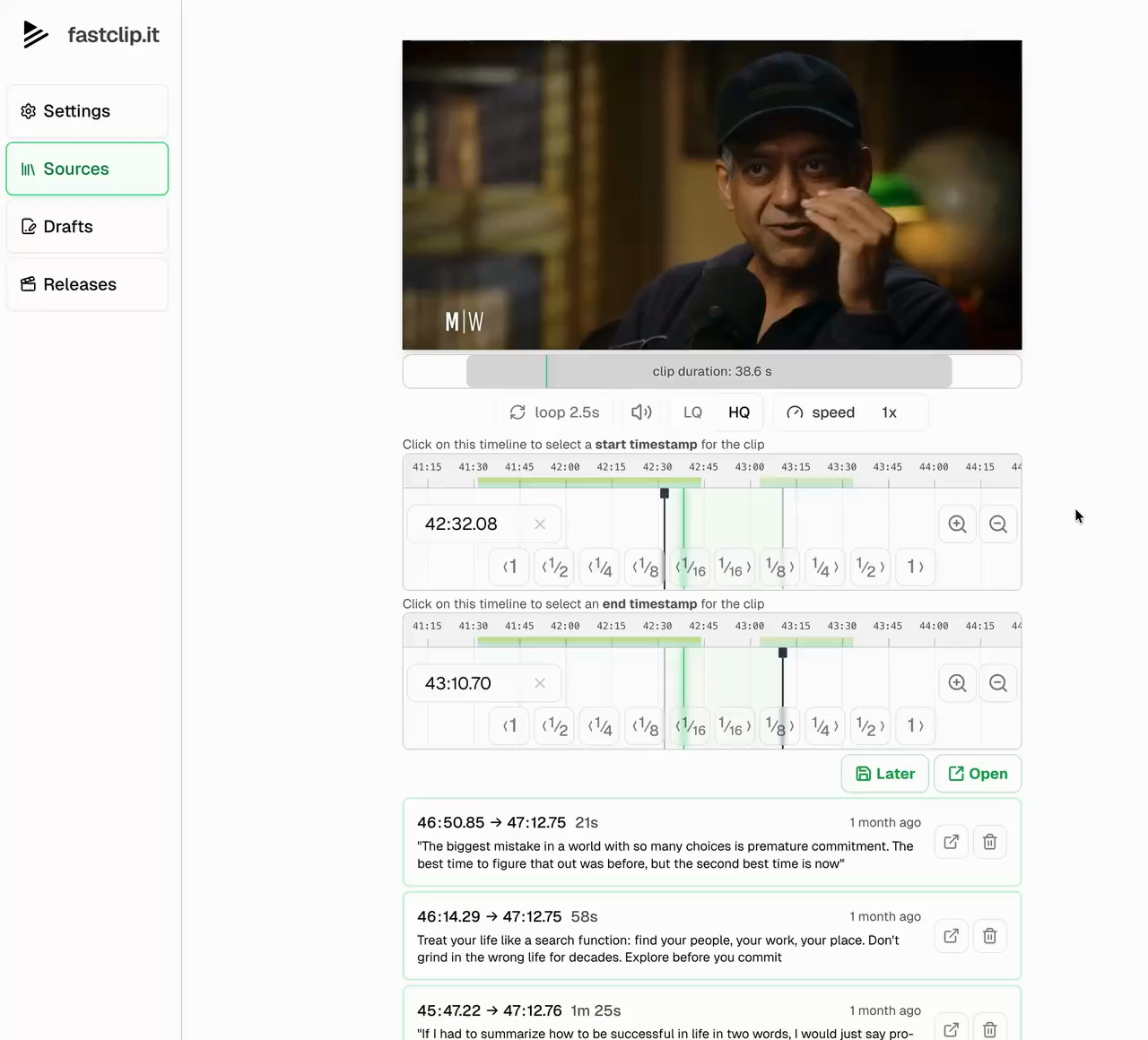
2. Select the start and end
FastClip opens the video on its most replayed moment and lists the other replay peaks as suggested moments; videos without replay data get moments picked from the transcript. Adjust the range on the timeline or choose words in the transcript. For an interview, include enough of the question to make the answer understandable without the full episode. To check a video’s replay peaks before importing it, use the free Most Replayed tool. Making a YouTube Short from it? See YouTube to Shorts for the 3-minute and Content ID rules.
3. Check captions and framing
Prepare a finished clip with word-timed captions. Review the crop, the first and last words, and names in the transcript. Add a title and source citation using your publishing template.
4. Publish or save the video
Connect Instagram or X to publish inside FastClip. To post on another platform, download the finished video and upload it yourself. FastClip does not currently publish directly to YouTube or TikTok.
A YouTube clip link or a finished video?
YouTube's Share at Timestamp makes a link to the whole video that starts at a chosen second; it has no end time and it is not a file. YouTube's Clips feature, which made a 5 to 60 second loop on YouTube, can no longer create new Clips. FastClip creates a separate video with your chosen start and end, captions, and publishing format.
If you only need to point someone to a moment, a Share at Timestamp link may be enough; see what replaced YouTube Clips. If you want a captioned video for your social accounts, use FastClip and check that you have permission to reuse the source.
To share a moment that also stops, make an embed link with a start and an end in the free YouTube clip link maker.
YouTube clipping questions
Can I clip YouTube videos on my phone?
Yes. Paste the link in FastClip using your mobile browser. You can also use the iPhone app through TestFlight. The video imports to FastClip without requiring a local download of the full source.
How long does it take to make a clip?
About a minute for a one-minute clip with captions. You do not wait for a long video to finish importing: make the clip a few seconds after you paste the link, and FastClip fetches the part of the video it needs first. The rest of the video keeps importing in the background for your next clips.
Does every YouTube link work?
Source access depends on YouTube and the video’s availability. Private, removed, age-restricted, or region-restricted videos may not import. If you own the video, you can use the original file instead.
How is this different from YouTube’s Clip button?
YouTube no longer lets you make new Clips: in April 2026 it announced that Share at Timestamp replaces them. That link opens the whole video at a start time, with no end, and it is not a file. FastClip makes a video file of up to five minutes, with your own start and end, captions and an optional 9:16 crop, that you can post on other platforms. The guide at fastclips.app/learn/how-to-clip-a-youtube-video compares the ways.
Can I make several clips from one video?
Yes. Keep the imported source and create separate drafts for different moments. Each finished clip can have its own title and publishing text. Plan and daily usage limits apply.
How much does it cost?
FastClip is free: 100 draft clips, 100 finished clips, 50 YouTube or upload imports, 50 X imports, Google Drive links with no total limit, and $5 of AI writing a month, plus 1 direct post each to Instagram and X. Daily limits: 50 drafts and 30 finished clips. No credit card.
Can I turn a YouTube podcast into Instagram Reels?
You can prepare captioned clips from a supported video podcast, then publish through a connected Instagram account. Preview the framing and full clip before posting. You must have the rights needed to republish the source.
Can my AI agent make clips?
Yes. Connect Claude Code, Codex or Cursor in Settings, then Agents. Give the agent a YouTube link and the moment you want, for example “clip the part where he explains the pricing”. The agent imports the video, searches its transcript for the words if the video has captions, and makes the clip: up to five minutes, in the original format or vertical 9:16. Its clips count toward your plan. See FastClip for AI agents.
Start with the moment you already found
Bring a YouTube link and try one clip. For interviews and longer conversations, see how FastClip works as a podcast clip maker.
Start clipping for free